Configure CORS
FastGateway supports CORS configuration to control cross-origin requests to your APIs.
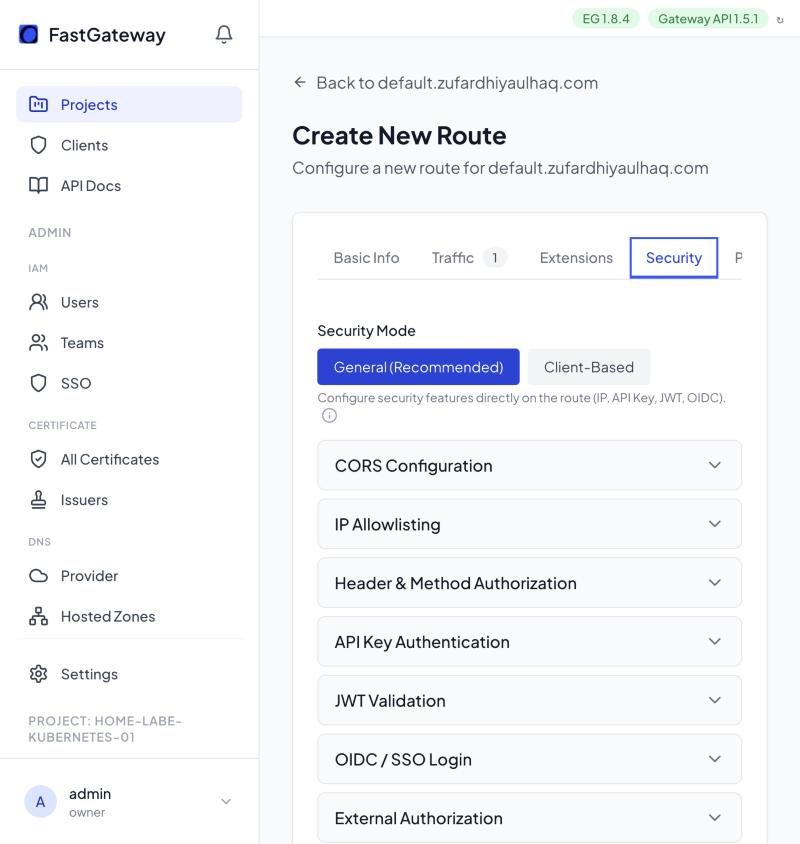
Configure in the UI
- In the route builder, open the Security tab.
- Expand CORS Configuration and check Enable CORS.
- Fill in the fields below:
- Allowed Origins: a comma-separated list of origins. Wildcards are supported.
- Allowed Methods: check the HTTP methods to allow (GET, POST, PUT, PATCH, DELETE, HEAD, OPTIONS).
- Allowed Headers: a comma-separated list of request headers clients may send.
- Expose Headers: a comma-separated list of response headers the browser is allowed to read.
- Max Age (seconds): how long browsers cache the preflight response.
- Allow Credentials: check Allow cookies and credentials if cookies or credentials are needed.
- Submit the route for approval. Once approved, the change deploys.
CORS Settings
| Field | Description |
|---|---|
| Allowed Origins | Origins allowed to access the resource |
| Allowed Methods | HTTP methods allowed for cross-origin requests |
| Allowed Headers | Headers that can be used in the request |
| Expose Headers | Headers exposed to the browser |
| Max Age (seconds) | How long preflight results can be cached |
| Allow Credentials | Whether cookies and credentials are allowed |
Wildcard Origins
Use * in Allowed Origins to allow all origins. This is not recommended for production with credentials.
When Allow Credentials is enabled, you cannot use * for Allowed Origins. List explicit origins instead.
The REST API equivalent is documented in the API Reference.